From Walkdown Scheduling to Mobile Punchlist Capture:
Streamlining the Complete Walkdown Workflow
“Digital transformation isn’t replacing people. It’s giving them more time to solve the problems that matter”
Introduction
Every project teaches us new technical lessons. Some also teach us better ways of working. This article is about one of those lessons.
In a previous article, I discussed the importance of subsystem walkdowns during Mechanical Completion and Systems Handover. This article builds on that by exploring how the entire walkdown workflow—from scheduling through real-time punchlist reporting—can be streamlined using practical digital solutions.
Yet, on many projects, the greatest delays occur not during the walkdown itself, but in the preparation, administration, and follow-up.
Scheduling, documentation, notifications, punchlists, photographs, database updates, and communication are often managed through disconnected tools and repetitive administrative work.
Every one of these activities consumes valuable project time.
Durante el avance de la construcción, es importante tener una vista rápida no solo por disciplina, sino ir un poco más allá: el tipo de trabajo crítico de construcción en progreso.
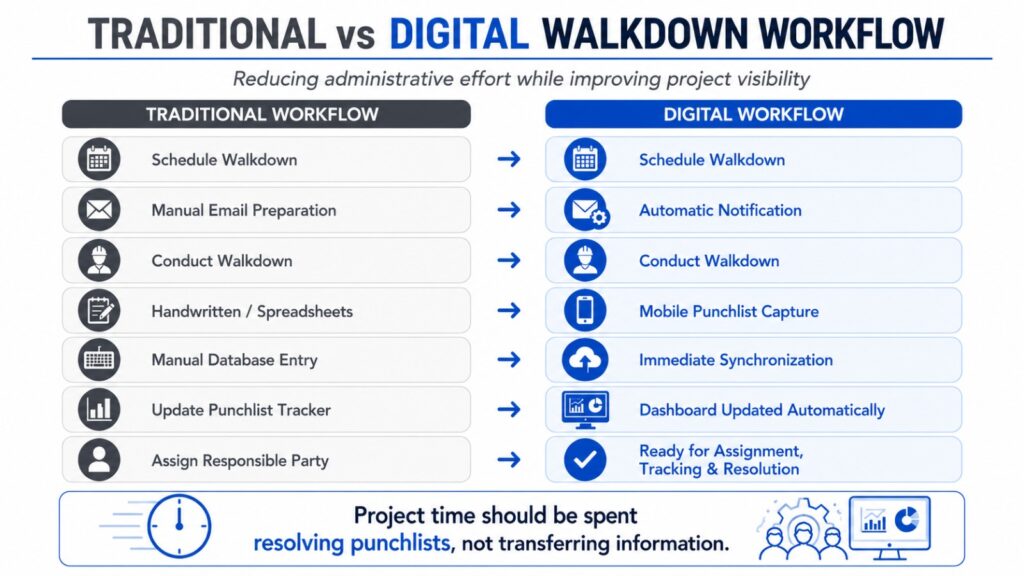
identifying an issue in the field and making it immediately visible to the people responsible for resolving it.
Case Studio
Now, let’s consider a project with 365 subsystems.
Before each walkdown, completions personnel typically spend 10 to 15 minutes scheduling attendees, preparing notification emails, inserting hyperlinks to the walkdown package, generating mobile punchlist access, and updating walkdown trackers.
By reducing that administrative effort to just two or three minutes, the workflow demonstrated in Video 1 saves approximately 12 minutes per walkdown—equivalent to more than 70 project hours over the course of the project.
But the savings don’t stop there.
On many projects, punchlists captured during the walkdown are still transferred manually from handwritten notes or spreadsheets into the completions database the following day. In a 365-subsystem project, that effectively accumulates 365 subsystem-days of delayed project visibility. And that’s assuming the information is entered the very next day—on some projects, the delay stretches to two or even three days.
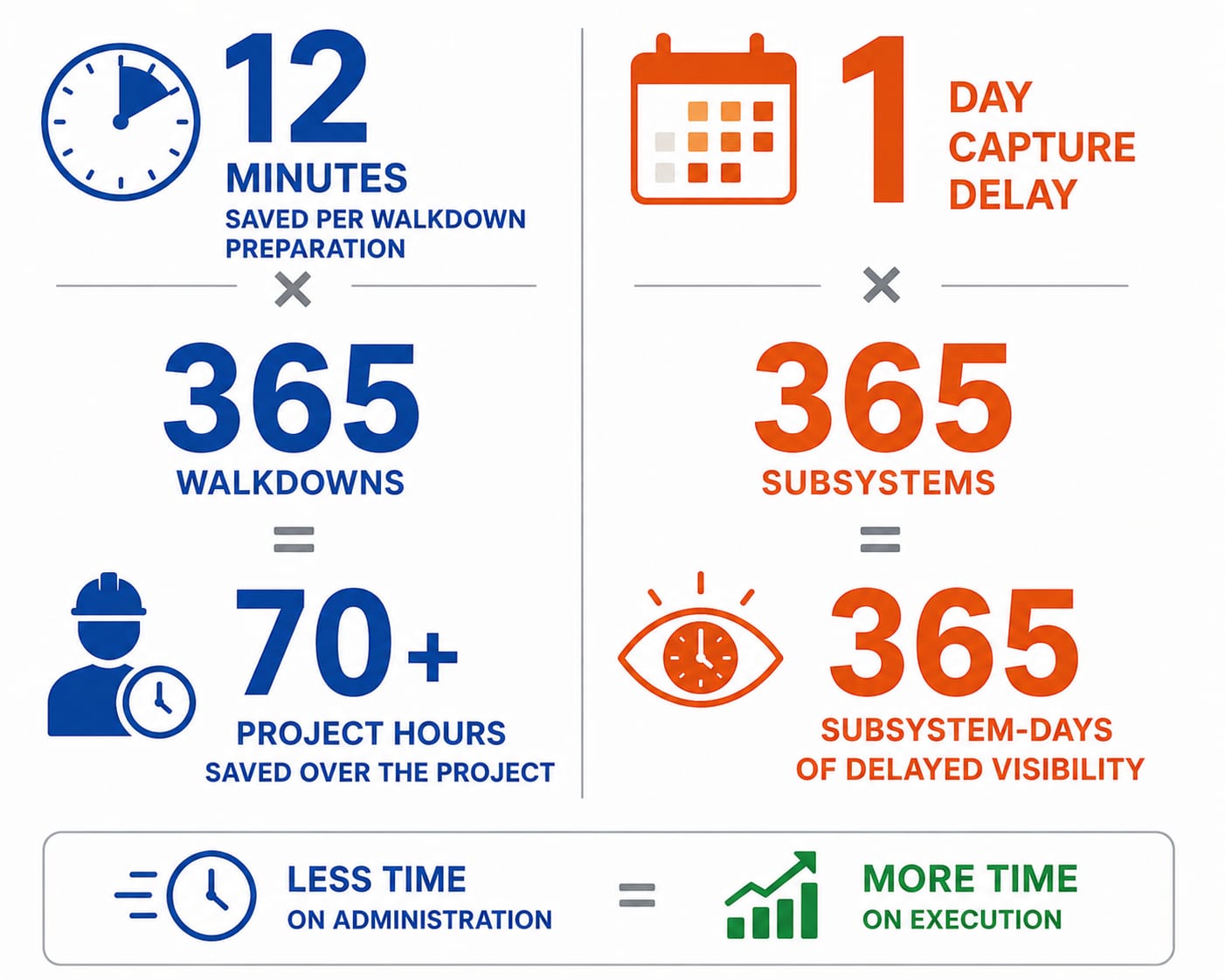
Beyond the time savings, reducing manual administration also minimizes common errors such as missed attendees, incorrect meeting details, outdated document links, transcription mistakes, duplicated work, misplaced files, and incomplete punchlist records.
Small improvements repeated hundreds of times across a project become significant gains.
The result isn’t simply a faster workflow. It’s better project visibility, quicker corrective actions, and more project time spent executing work instead of administering it.
The workflows demonstrated in the following videos show a practical approach I’ve developed to help achieve exactly that.
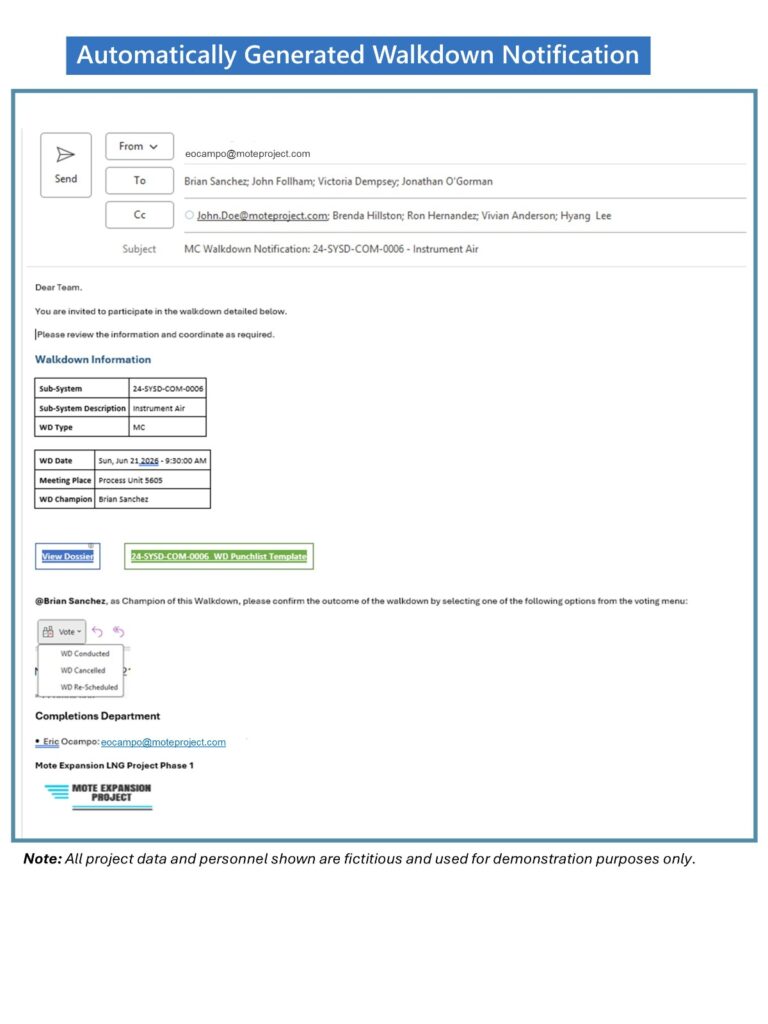
All project data and personnel shown are fictitious and used for demonstration purposes only
The objective is simple:
Reduce administration. Increase execution.
Step 1 – Walkdown Administration
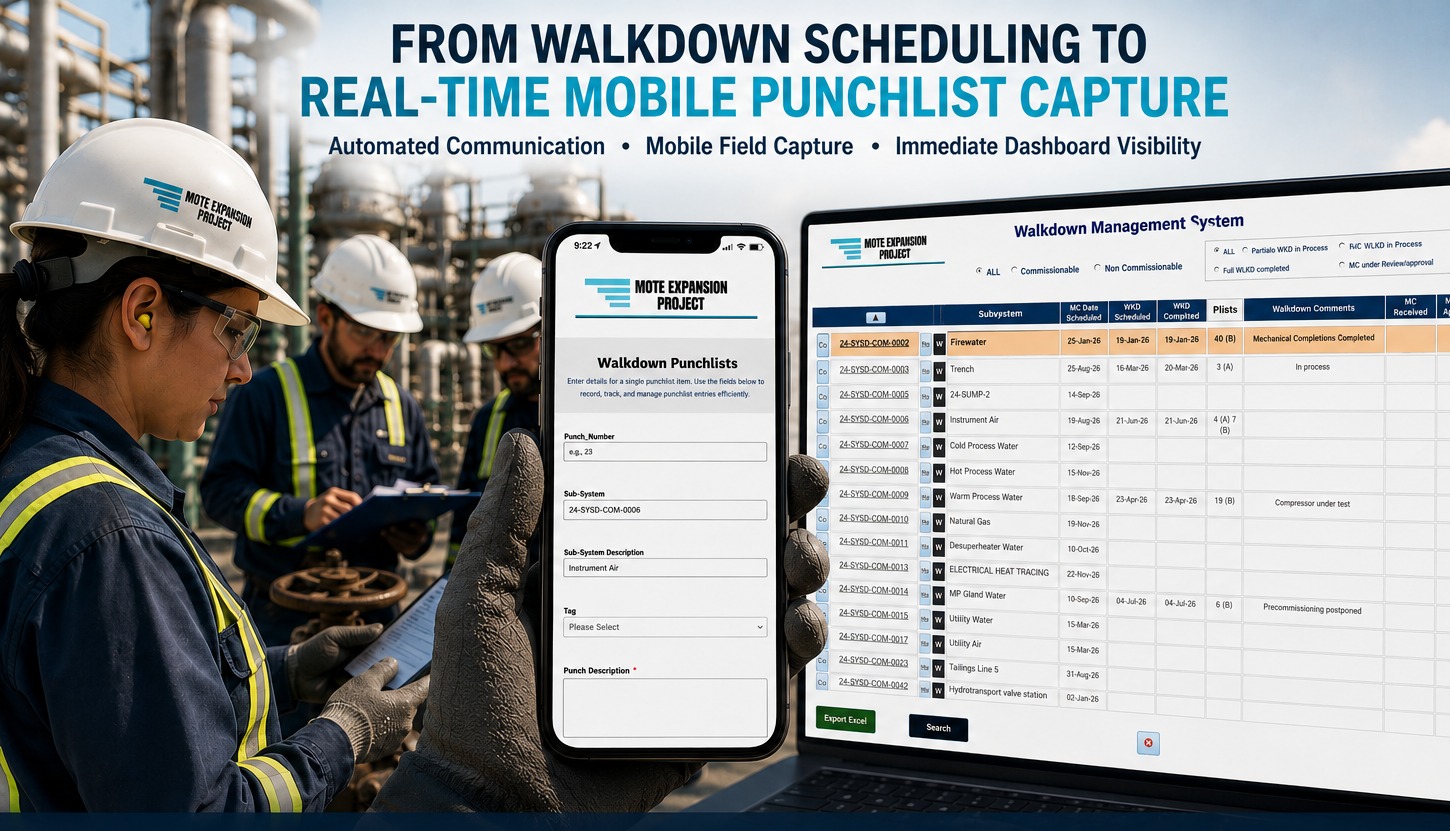
The first video demonstrates how the administrative portion of a walkdown can be streamlined from a single dashboard.
Automatically generated walkdown notification including package hyperlinks and mobile punchlist access.
With only a few clicks, the workflow schedules the walkdown, prepares the notification, generates the required hyperlinks, provides mobile punchlist access, and distributes everything the team needs before entering the field.
Instead of manually preparing emails, locating documentation, and copying links, the administrative effort is reduced to a repeatable workflow.
Step 2 – Mobile Field Punchlist Capture
Once the walkdown begins, punchlists are entered directly from a mobile device using a punchlist form.
Instead of handwritten notes that require transcription later, punchlists are created immediately while the team is still in front of the equipment.
Photos become part of the record at the source.
Even more importantly, multiple walkdown participants can capture punchlists simultaneously, eliminating the traditional bottleneck where a single person is responsible for recording every observation.
Step 3 – Immediate Dashboard Synchronization
The final video closes the loop.
The punchlists entered from the field become immediately available within the management dashboard for review, assignment, tracking, and resolution.
No waiting for handwritten notes.
No duplicate data entry.
No next-day updates.
Just real-time project visibility.
Conclusions
Whether the solution involves MS Access, SQL, SharePoint, mobile forms, workflow automation, cloud services, or AI, the goal remains the same: reducing administrative effort so project teams can focus on executing the work.
Technology will continue to evolve. The objective won’t.
Thank you for taking the time to read this article.
If you’ve experienced similar challenges on your projects—or have developed different approaches to improve Mechanical Completion workflows—I would enjoy hearing your thoughts.
If you found this article useful, please consider sharing it with colleagues who work in Construction, Commissioning, Mechanical Completion, or Project Controls. Hopefully, some of these ideas can help simplify their own project workflows.
This article also marks the beginning of a new series where I’ll continue sharing practical project workflows and digital solutions developed throughout my EPC projects.
If this is the first of my articles you’ve come across, I invite you to check out my earlier publications.
On a completely different note…
Four years ago, ahead of the 2022 FIFA World Cup, I wrote that we were likely witnessing the final World Cup appearances of Lionel Messi and Cristiano Ronaldo.
Fortunately for football fans, I was wrong.
This time, though, it truly feels like the closing chapter of one of the greatest rivalries in football history.
As I write this, the 2026 FIFA World Cup has reached the semifinals.
🇫🇷 France, 🏴 England, 🇪🇸 Spain, and 🇦🇷 Argentina have earned their places after several exciting matches and no shortage of controversy.
France has looked the most complete team in the tournament to me, but that’s the beauty of knockout football: being the favorite guarantees nothing.
Wherever you are, enjoy the semifinals—and good luck to your team.
Thank you again for reading.
See you in the next article.
Eric Ocampo
Eric Ocampo is a Project Management Professional and Microsoft Access Certified Specialist with an Electronic Sciences Degree. He is a proactive Database Administrator/Developer that has worked in Construction, Oil & Gas projects in North and South America, and the Middle East since 2001. He has worked in Mechanical Completions as System Completions Database Administrator (SCDBA) using GoCompletions, MCPlus, Smart Completions Hexagon and WinPCs, and as a Database Developer, he has developed applications for Project Turnover, Completions, Materials, Preservation, Dossier reviews, Weld Tracking, Instrument loops, etc.
His early experience includes a role as MWD (Measure While Drilling) Operator with Anadrill Schlumberger.